
Unused Microsoft 365 Licenses Report (PowerShell + Microsoft Graph)

PowerShell script to build report of Microsoft 365 licenses for users that haven’t signed into their account for a while.
Intro
Use this script when you need to free up Microsoft 365 licenses. It will output a simple report of users with licenses attached that haven’t signed into their account for some period.
This script is meant to be run on a schedule and therefore requires creation of Entra ID app registration for connecting to Microsoft Graph.
Azure/Entra ID App Registration
I’m not going to go in detail about it but you can review the Microsoft documentation if this is your first time.
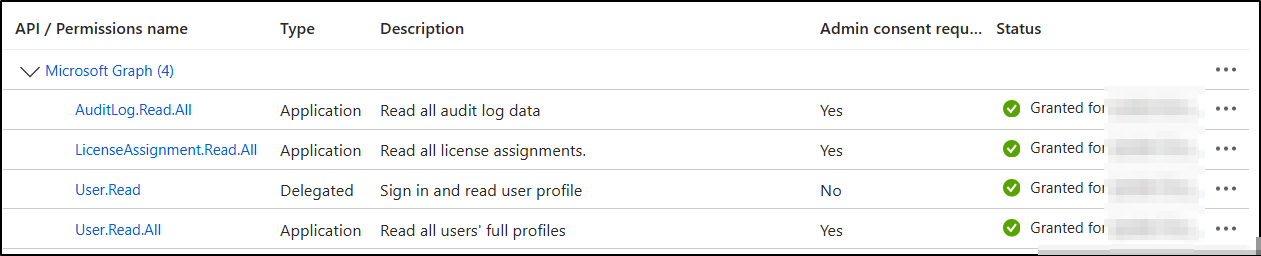
The app will need the following Application permissions.
- AuditLog.Read.All : Reading login activity
- LicenseAssignment.Read.All : Reading tenant licenses
- User.Read
- User.Read.All : Reading user data
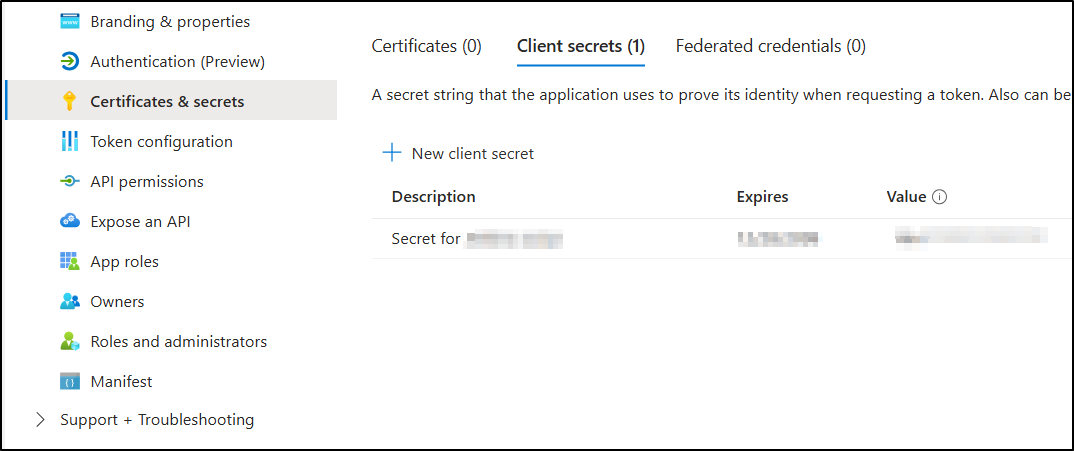
Next, create a client secret under the app.
Once the steps above are completed, you’ll need the following items from the app registration for the PowerShell script:
- Tenant ID (Also referred to as Directory ID)
- Client ID (Also referred to as Application ID)
- Client secret (Which you created under “Certificates & Secrets” category of the app)
Continue to PowerShell script once the app registration steps above are completed.
Script
The script is ready to run, you just need to modify the following 4 variables:
$InactiveDays: The number of days a user must be inactive before being flagged.$tenantID: From the app registration above$clientID: From the app registration above$clientSecret: From the app registration above
Your output will something like this, feel free to modify it and do whatever you like with it!

Reference for the license names: https://learn.microsoft.com/en-us/entra/identity/users/licensing-service-plan-reference
Script
<#
Using Microsoft Graph API, get users that havent signed in for specific amount of days. If they have M365 licenses attached, output report with their info attached.
#>

$InactiveDays = 90 # Filter to include only users that havent signed in in the last $InactiveDays

#App Registration details for connecting to Microsoft Graph
$tenantID = "[YOURTenantID]"
$clientID = "[YourAzureAppRegistrationAppID/ClientID]"
$clientSecret = "[YourClientSecretForTheAzureApp]"

$Body = @{
    Grant_Type    = "client_credentials"
    Scope         = "https://graph.microsoft.com/.default"
    Client_Id     = $clientID
    Client_Secret = $clientSecret
}

$Connection = Invoke-RestMethod `
    -Uri https://login.microsoftonline.com/$TenantID/oauth2/v2.0/token `
    -Method POST `
    -Body $body

#Get the Access Token
$Token = $Connection.access_token

# Get organization licenses
$skuUrl = "https://graph.microsoft.com/v1.0/subscribedSkus"
$headers = @{
    Authorization      = "Bearer $Token"
    "ConsistencyLevel" = "eventual"
}
$skuResponse = Invoke-RestMethod -Uri $skuUrl -Headers $headers -Method Get
$skuLookup = @{}
foreach ($sku in $skuResponse.value)
{
    $skuLookup[$sku.skuId] = $sku.skuPartNumber
}

# Get users that havent signed in for $inactiveDays along with their license info
$date = (get-date).AddDays(-$InactiveDays) | Get-Date -Format "o" # days to subtract for filter
$filter = "signInActivity/lastSuccessfulSignInDateTime le $date"
$encodedFilter = [uri]::EscapeDataString($filter)
$url = "https://graph.microsoft.com/v1.0/users?`$select=userprincipalname,displayName,signInActivity,assignedLicenses&`$filter=$encodedFilter"
$headers = @{
    Authorization      = "Bearer $Token"
    "ConsistencyLevel" = "eventual"
}
$response = Invoke-RestMethod -Uri $url -Headers $headers -Method Get

# Include only users with userprincipalname
$users = $response.value | Where-Object { $_.PSObject.Properties.Name -contains "userPrincipalName" -and $_.userPrincipalName }

# Build report
$report = foreach ($user in $users)
{
    # if assignedLicenses exists
    if ($user.assignedLicenses)
    {
        $user.assignedLicenses | Select-Object `
        @{Name = 'DisplayName'; Expression = { $user.displayName } },
        @{Name = 'UserPrincipalName'; Expression = { $user.userPrincipalName } },
        @{Name = 'LicenseName'; Expression = { $skuLookup[$_.skuId] } },
        @{Name = 'lastSignInDateTime'; Expression = { $user.signInActivity.lastSignInDateTime } },
        @{Name = 'lastSuccessfulSignInDateTime'; Expression = { $user.signInActivity.lastSuccessfulSignInDateTime } }
    }
}

# Output
$report | Sort-Object DisplayName | Format-Table